
Mobility Online
Mobility Online – Your Guide for a Smooth International Exchange
What is Mobility Online?
Mobility Online is the platform where you organize everything related to your international exchange during your studies at UHasselt. From your initial application to the checklists after your return: Mobility Online (MO) guides you through the entire process step by step.
This online guide is made for you as a UHasselt student so that you:
- understand quickly what you need to do
- never forget a step
- always know where you are in the process
- find all documents in the right place immediately
What can you do in Mobility Online?
- Submit Your Application / Nomination
You will be informed through your programme when you can apply for study or internship abroad (or in Wallonia). You will receive an email with a link to the registration form in MO. Register, fill in your general information, and send your exchange application.
Deadline: February 20 - Submit Scholarship Application
For your stay abroad you may be eligible for a mobility grant. Apply for this grant via your Mobility Online dossier. Make sure to meet the deadlines.
Deadline for scholarship application outside the EU (incl. UK & Switzerland): March 10
Deadline for scholarship application within the EU: April 30 - Before Departure
Upload your documents, work on your Learning Agreement, and follow the pre-departure steps in your MO dossier so you don’t miss anything. - During Your Stay (Updating Information)
If something needs to be adjusted in your course package or documents, Mobility Online helps you take the correct steps. - After Your Return (Finalizing)
Submit your final documents, close your dossier properly, and make sure everything is administratively completed.
How to apply for a study or traineeship abroad
How to submit an application for a study abroad
How to submit an application for a study abroad
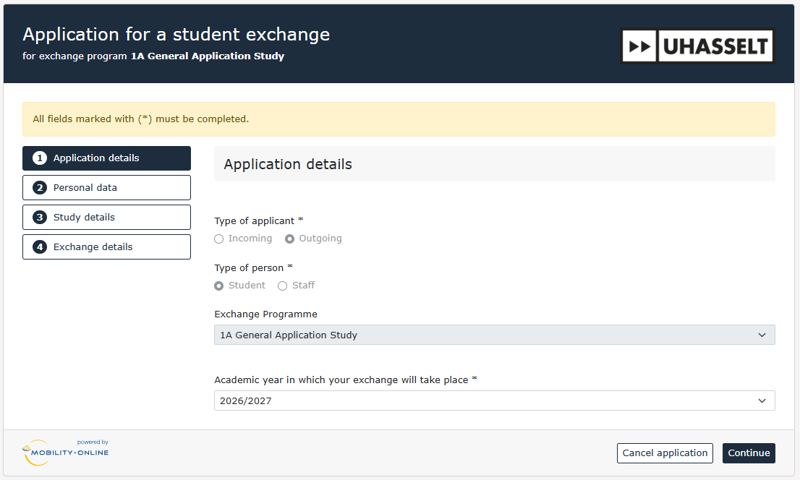
Step 1 - Application details
The basic information is filled in automatically. Just click “continue” to complete your details.
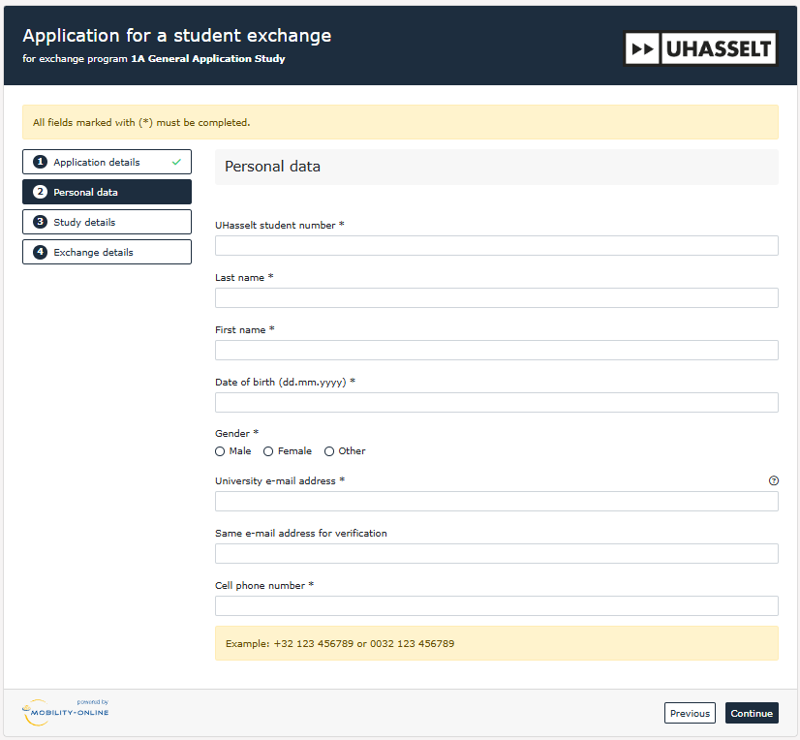
Step 2 - Enter your personal details
Provide the following:
- UHasselt student number (important: double-check!)
- Last name
- First name
- Date of birth
- Gender
- UHasselt email address (important: double-check!)
- Mobile phone number
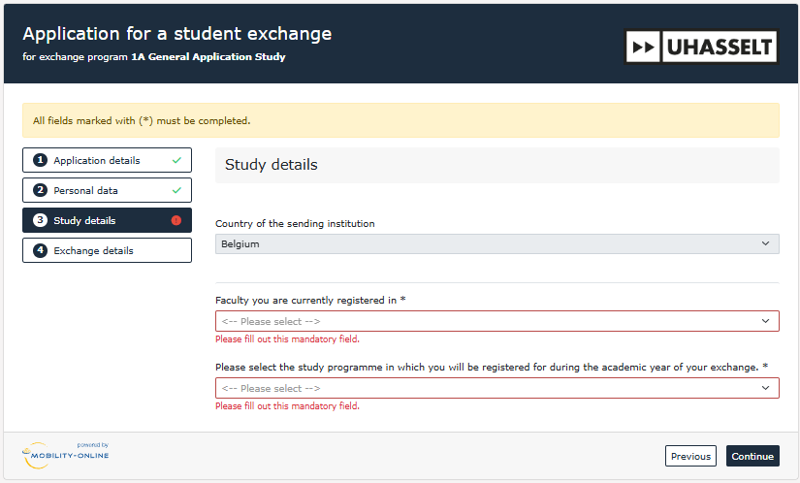
Step 3 - Choose your faculty and programme
Select your faculty and the correct study programme in which the exchange will take place.
Step 4 - Select the semester
Indicate when you will go on exchange:
- Semester 1 - 202x
- Semester 2 - 202x
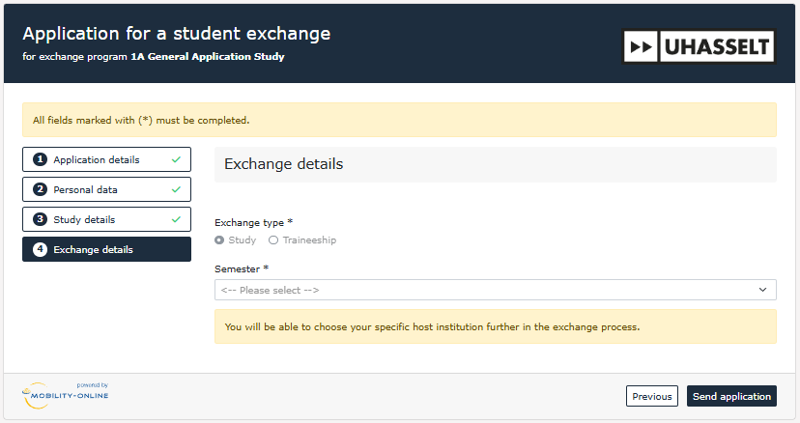
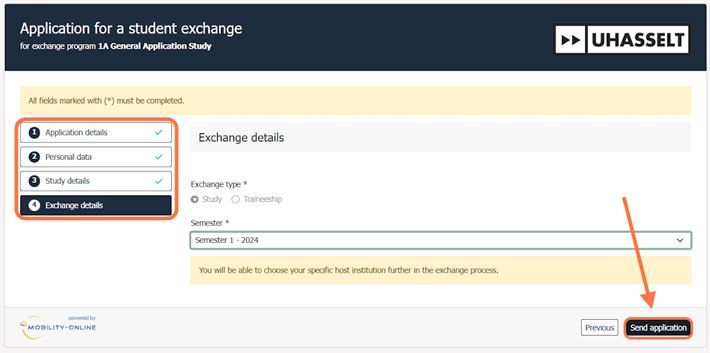
Step 5 - Review and submit
Check that all fields are filled correctly and that each step is marked with a green check mark. If everything is correct:
⇒ click “send application.”
Step 6 - Check your email
Check your UHasselt email and follow the instructions. Click the link found at the bottom of the email and save it in your bookmarks.
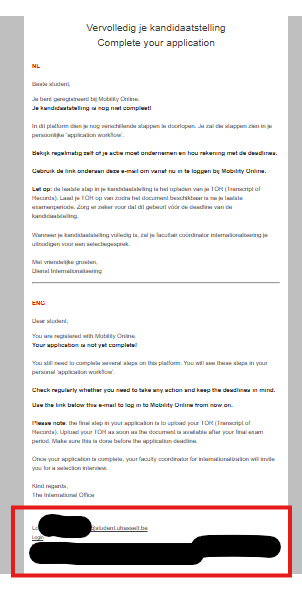
Step 7 - Open your file in Mobility Online
Use the link from the email and log in with your UHasselt email and password. You can now view your file at any time.
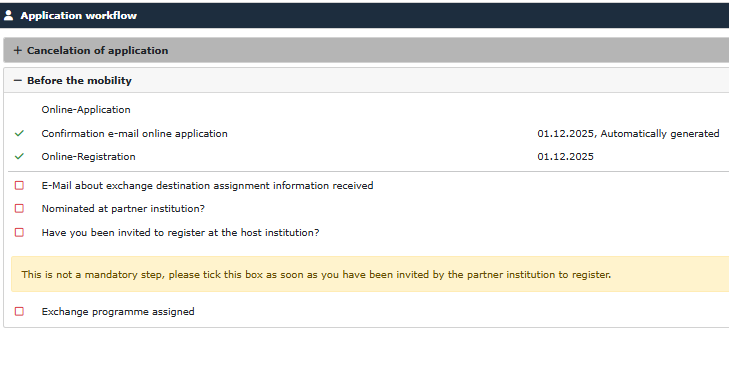
Step 8 - Wait for the next email to complete your application
Once you receive the next email, you can complete your application further by adding your chosen destinations and motivation.
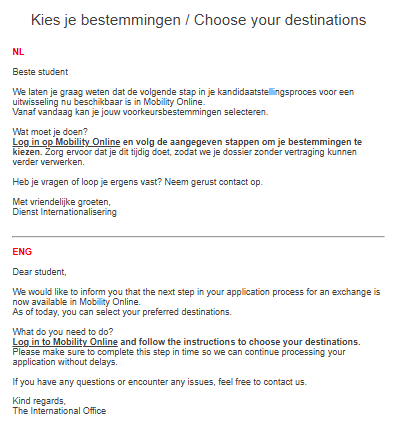
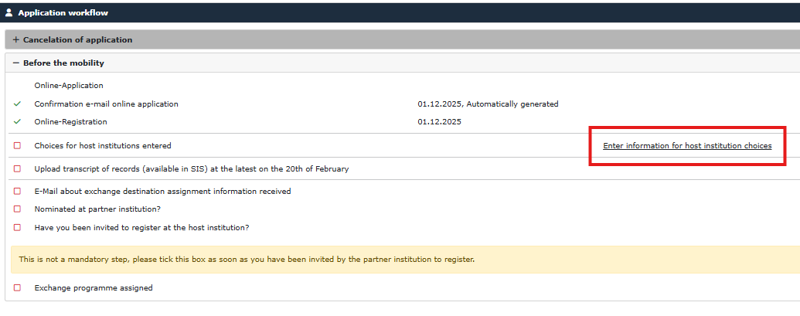
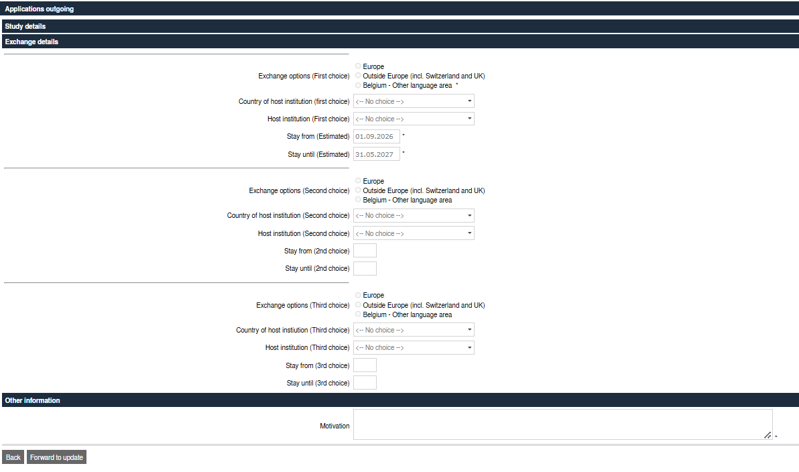
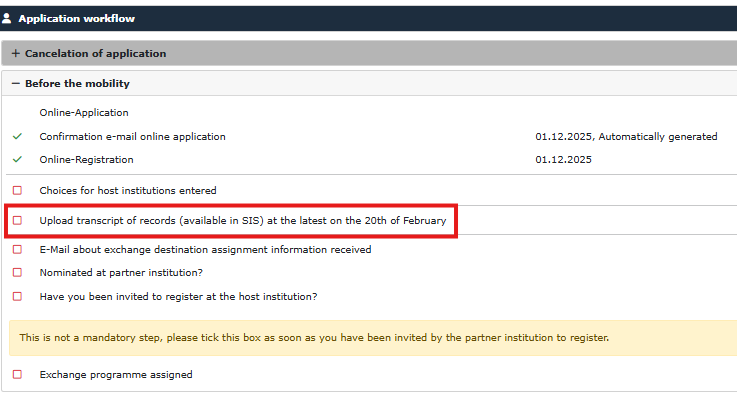
Step 9 - Complete your application with your Transcript of Records (TOR)
Complete your dossier by uploading your Transcript of Records. You can download it from your student portal.
Upload your TOR once your latest exam results are known and before the February 20 deadline.
After that your application is complete.
 What is a Transcript of Records?
A Transcript of Records is your official grade report, providing a complete overview of all your achieved academic results (per course: course name, number of credits, and grade).
How to download your Transcript of Records
Are you a 2nd- or 3rd-year bachelor student?
- Log in to the Student Portal.
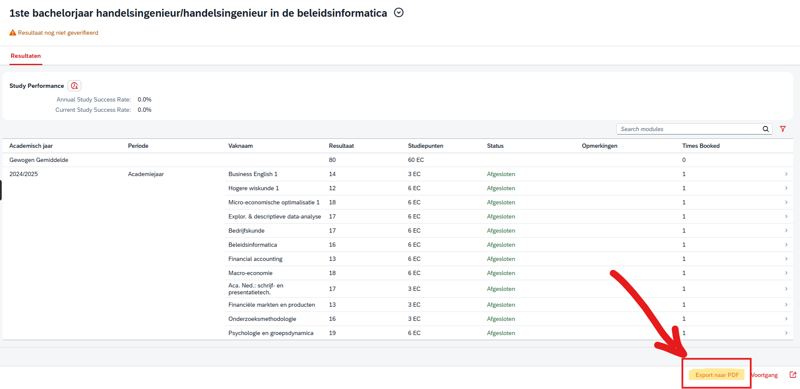
- Navigate to the page where you can view your academic results (see screenshots below).
- Download your grade reports for all bachelor years.
- Combine all documents into a single PDF file.
- Upload this PDF file to your file in Mobility Online.
Are you a master’s student?
- Log in to the Student Portal.
- Navigate to the page where you can view your academic results (see screenshots below).
- Download your grade reports for all bachelor years.
- Download your master grade report as well (or both master year 1 and master year 2 grade reports).
- Combine all documents into a single PDF file.
- Upload this combined document to your file in Mobility Online.

How to submit an application for a traineeship abroad
How to submit an application for a traineeship abroad
Step 1 - Application details
The basic information is filled in automatically. Just click “continue” to complete your details.
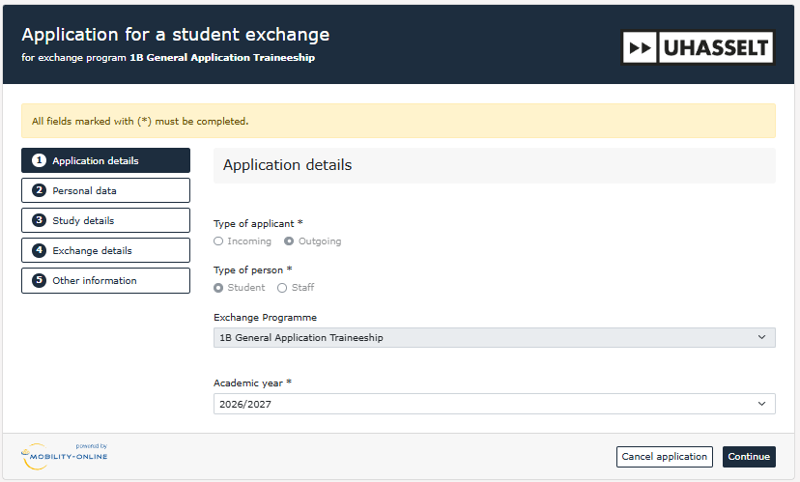
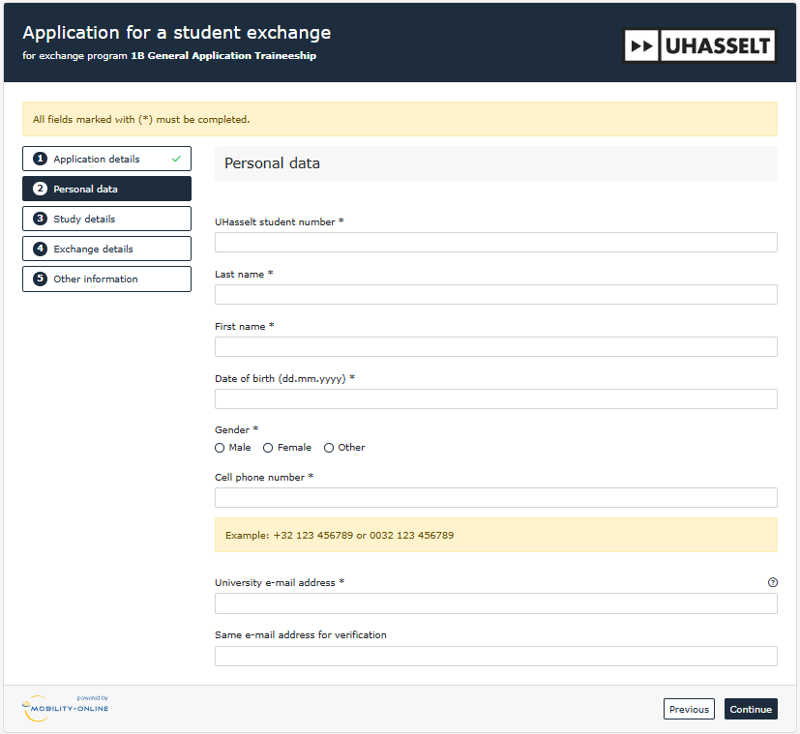
Step 2 - Enter your personal details
Provide the following:
- UHasselt student number (important: double-check!)
- Last name
- First name
- Date of birth
- Gender
- UHasselt email address (important: double-check!)
- Mobile phone number
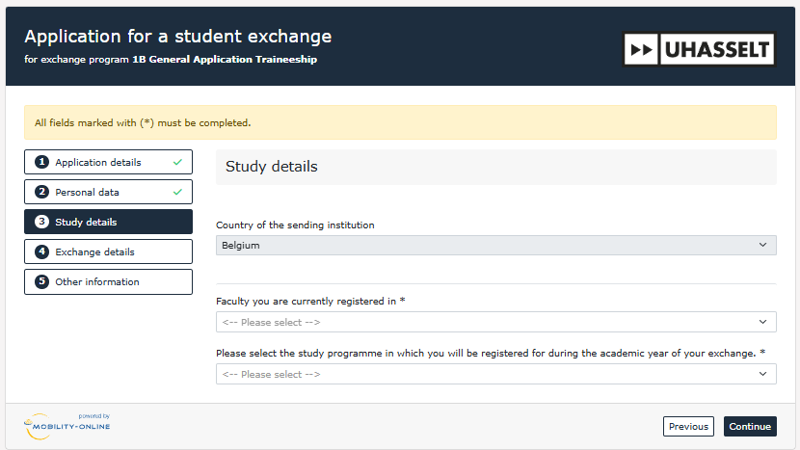
Step 3 - Choose your faculty and study programme
Select your faculty and the correct study programme in which the exchange will take place.
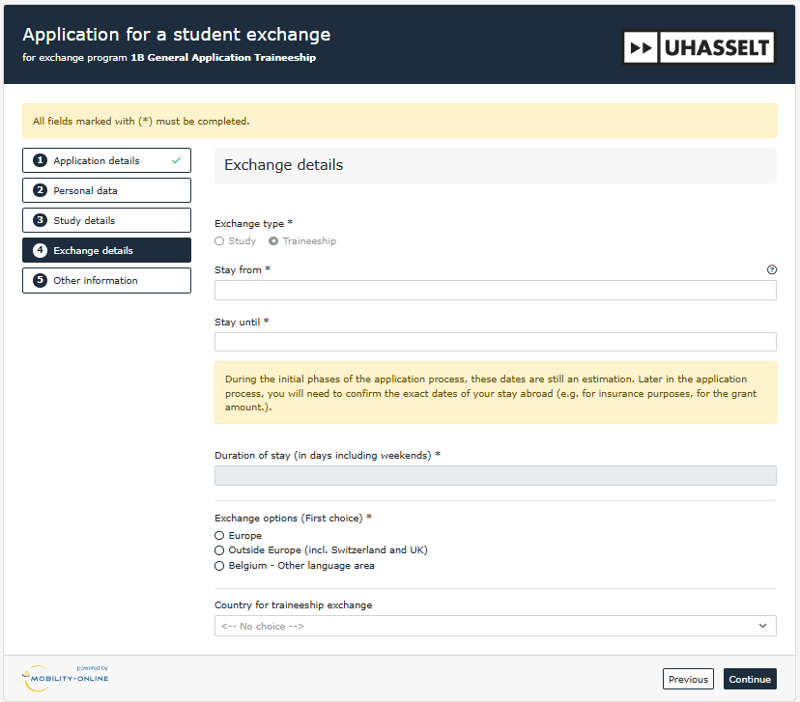
Step 4 - Select the semester
Indicate when and where you will go on exchange:
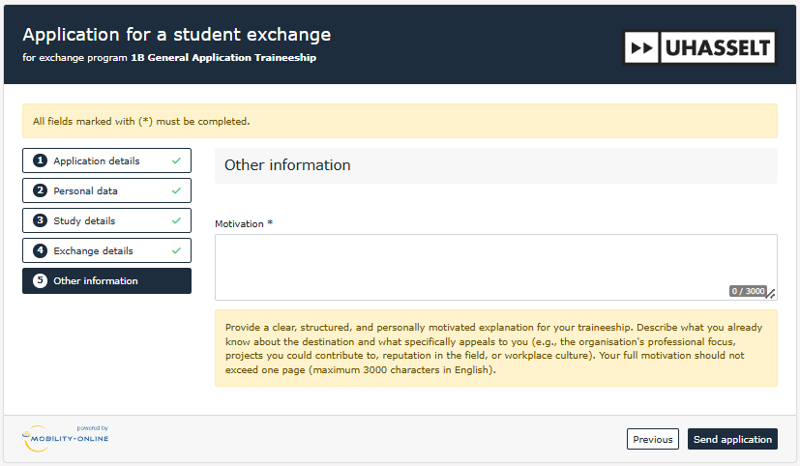
Step 5 - Write your motivation, review and submit
- Write a clear motivation
- Check that all fields are filled correctly
- Each step is marked with a green check
- If everything is correct:
⇒ click “send application.”
Step 6 - Check your email
Check your UHasselt email and follow the instructions. Click the link found at the bottom of the email and save it in your bookmarks.
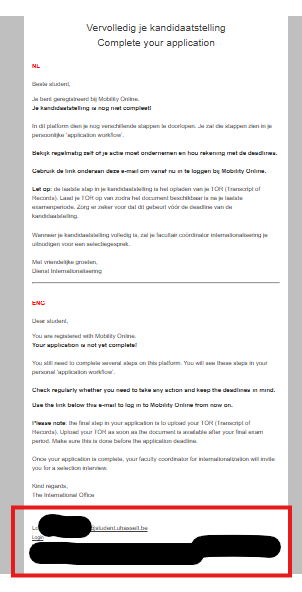
Step 7 - Open your application in Mobility Online
Use the link from the email or click here. Log in with your UHasselt email and password. You can now view your dossier at any time.
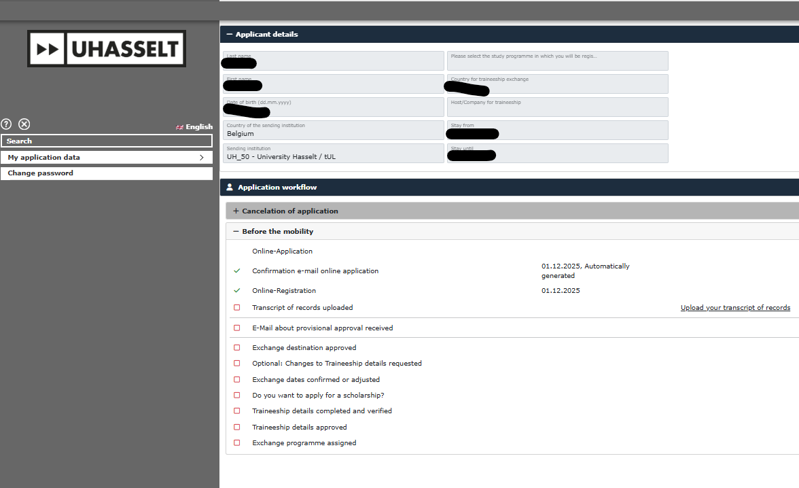
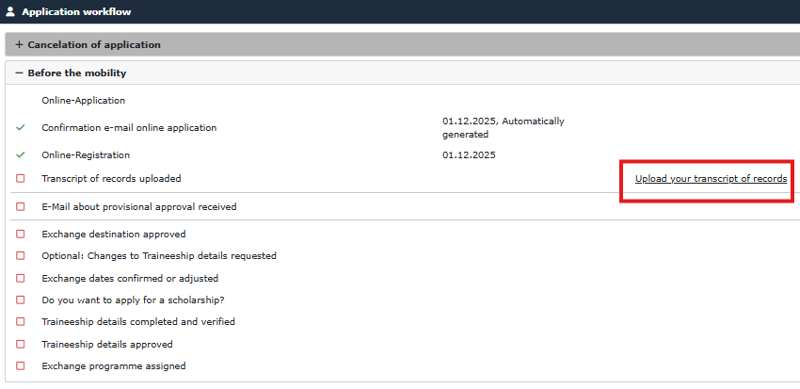
Step 8 - Complete your application with your Transcript of Records (TOR)
Complete your dossier by uploading your Transcript of Records. You can download it from your student portal.
Upload your TOR once your latest exam results are known and before the February 20 deadline.
After that your application is complete.
What is a Transcript of Records?
A Transcript of Records is your official grade report, providing a complete overview of all your achieved academic results (per course: course name, number of credits, and grade).
How to download your Transcript of Records
Are you a 2nd- or 3rd-year bachelor student?
- Log in to the Student Portal.
- Navigate to the page where you can view your academic results (see screenshots below).
- Download your grade reports for all bachelor years.
- Combine all documents into a single PDF file.
- Upload this PDF file to your file in Mobility Online.
Are you a master’s student?
- Log in to the Student Portal.
- Navigate to the page where you can view your academic results (see screenshots below).
- Download your grade reports for all bachelor years.
- Download your master grade report as well (or both master year 1 and master year 2 grade reports).
- Combine all documents into a single PDF file.
- Upload this combined document to your file in Mobility Online.
What happens after your application?
What happens after your application?
Assessment of your application
After February 20 (or earlier for some study programmes), your application will be processed and assessed. Depending on your programme, you might be invited for a selection interview. Once all files have been processed, you will be definitively informed whether you have been selected.
Are you selected?
The next steps depend on the type of your application:
- Study abroad: You will receive an email containing your assigned destination.
- Traineeship abroad: You will initially be selected 'conditionally'. You will receive a confirmation email about this.
Next: Complete the following steps in Mobility Online.
Are you not selected?
If you are not selected, your application will be canceled. You will always receive an email explaining the reason. Do you still have questions after reading this email? Feel free to contact your faculty coordinator for internationalisation.
Steps to take after being selected (before the scholarship application)
Selected for a study abroad?
Selected for a study abroad?
Congratulations, you are selected! What now?
You have received an email stating that you have been selected for a specific destination. Before you can proceed, you must accept (or decline) this destination. Follow these exact steps:
- Accept your destination.
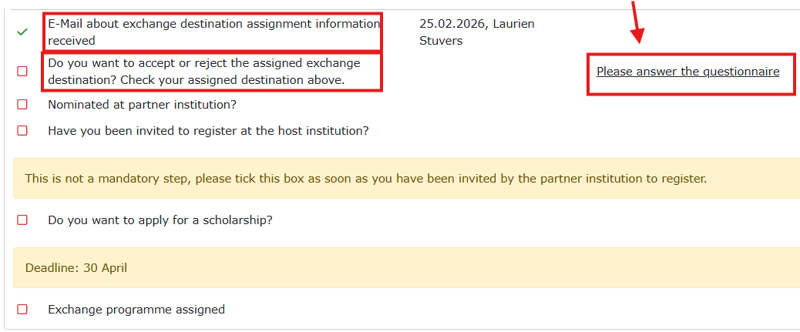
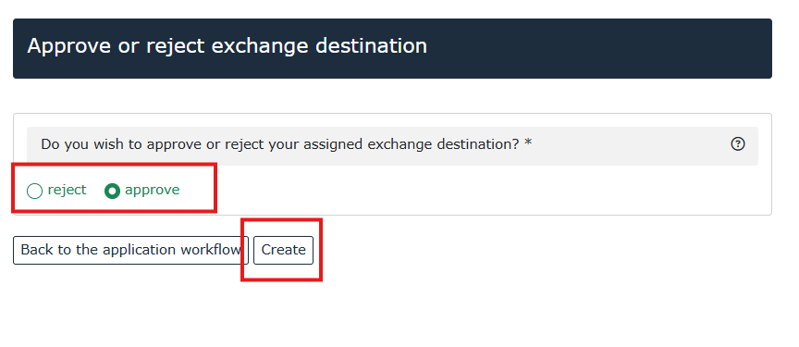
What happens next?
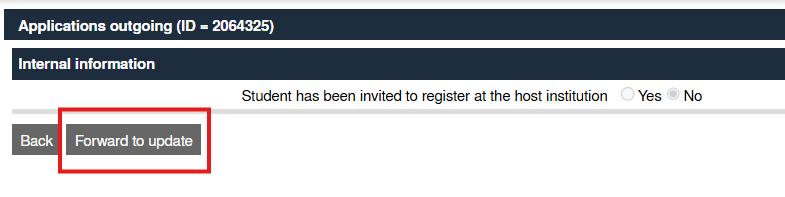
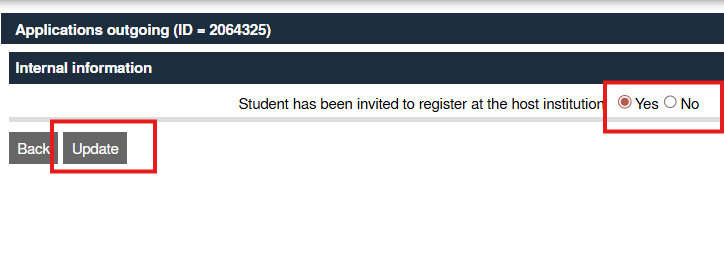
After accepting your destination, you will be nominated at the partner institution. The timing of this nomination varies from partner to partner. If you have any questions about this, please contact Erasmus@uhasselt.be.
As soon as you receive an email from your partner institution asking you to register, please indicate this in your workflow. Follow the steps provided in Mobility Online to do so.
Note: These steps are non-blocking. This means you do not have to wait to apply for your scholarship until these steps are completed.
Conditionally selected for a traineeship abroad?
Conditionally selected for a traineeship abroad?
Congratulations, you are conditionally selected! What now?
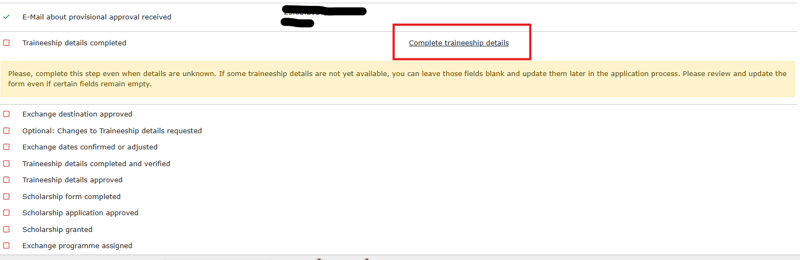
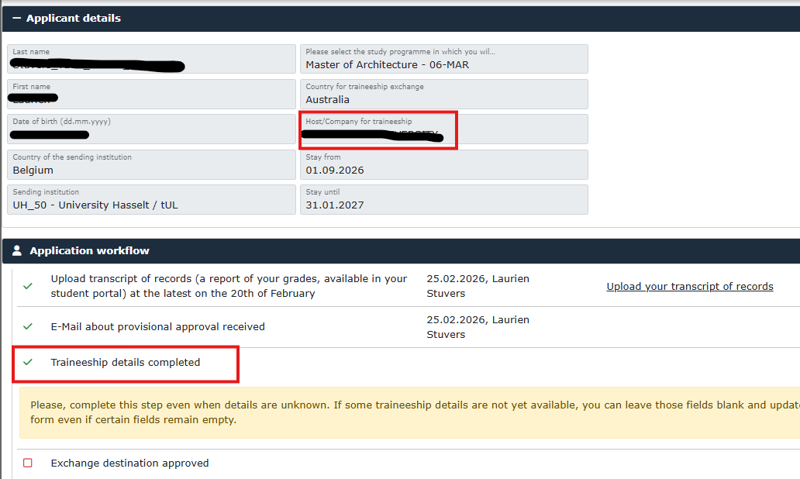
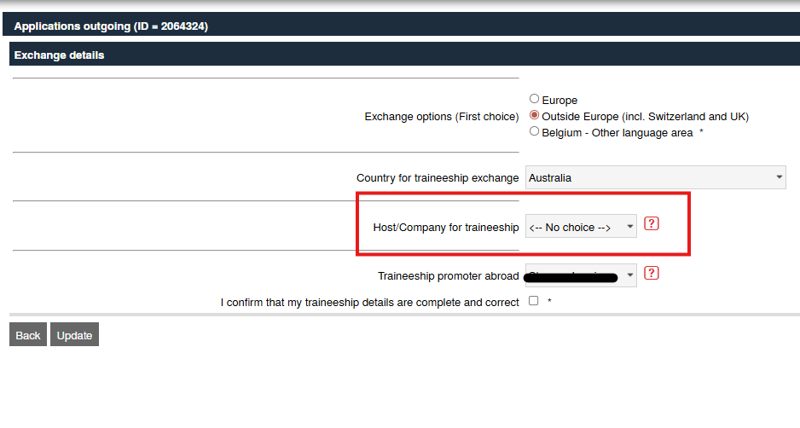
You have received an email stating that you are conditionally selected. This means you must now enter your traineeship details yourself in Mobility Online. Follow these exact steps:
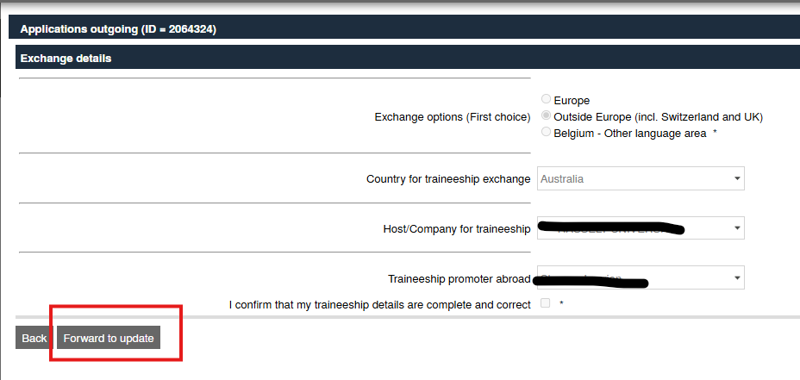
1. "Complete traineeship details"
- Click the link in your workflow: Complete and verify traineeship details.
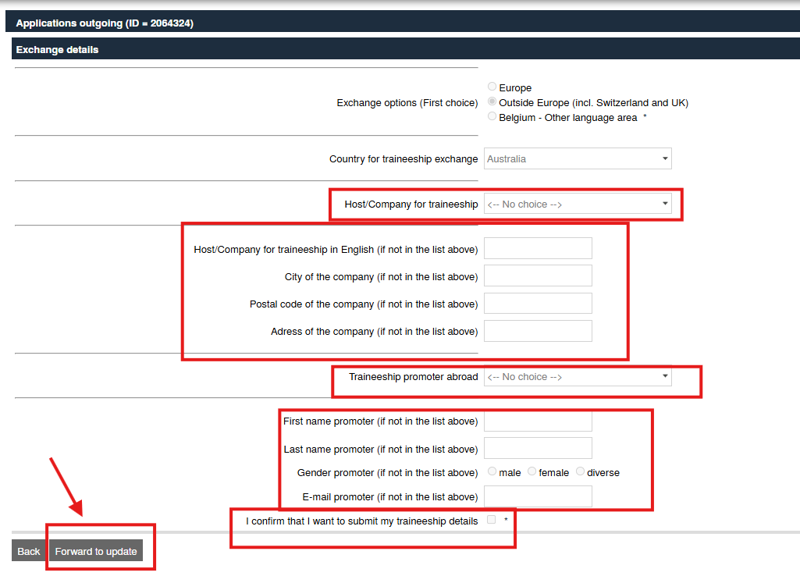
- Click on Forward to Update.
- Select the company where you will do your traineeship from the dropdown menu at Host/Company for traineeship.
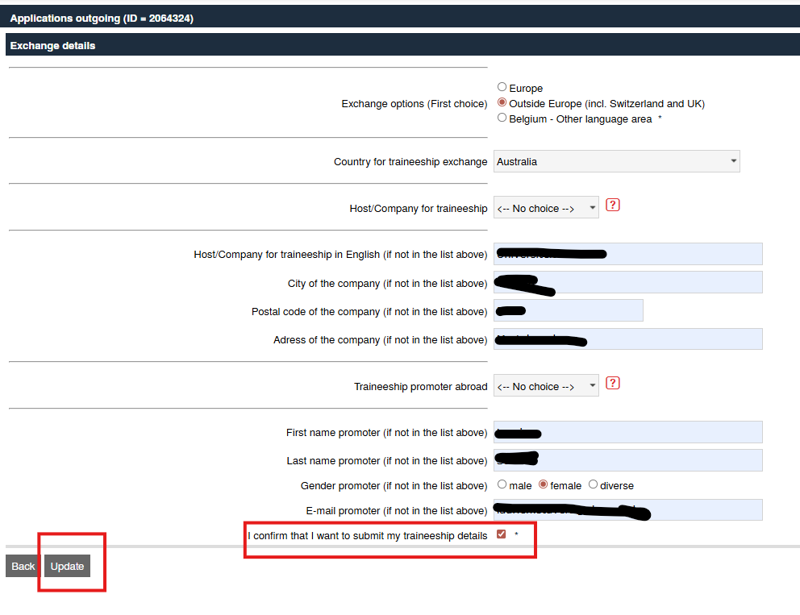
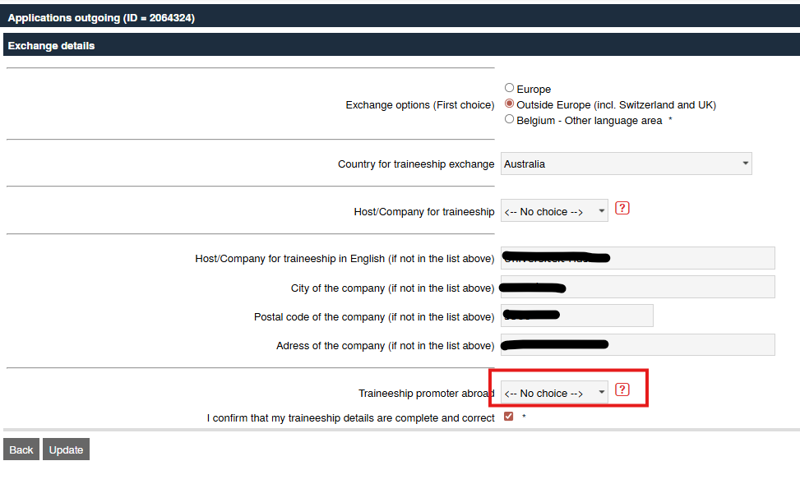
- Is your traineeship company not listed? Select the option <-- No choice -->. Additional fields will appear. Type in the name and address of your company yourself.
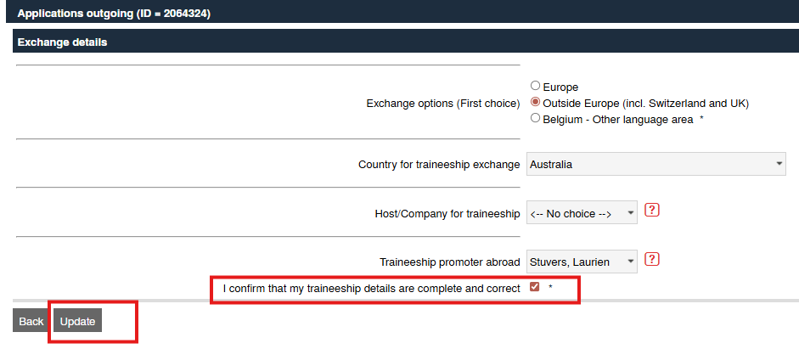
- Next, select your traineeship supervisor abroad at Traineeship promoter abroad. Is your supervisor not listed? Select <-- No choice --> and fill in the correct details in the extra fields.
- Check the box next to I confirm that my traineeship details are complete and correct.
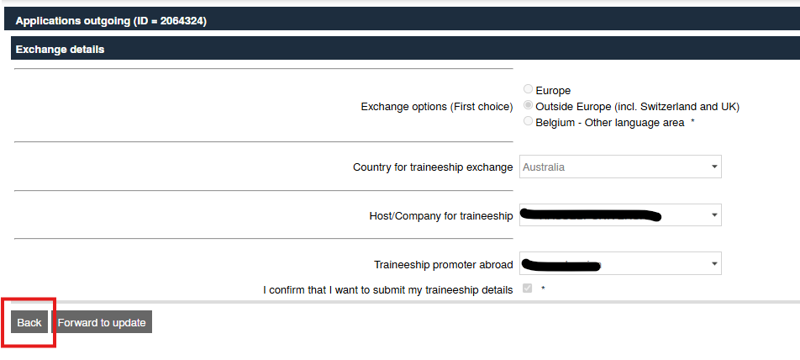
- Click the Update button to confirm and submit everything.
2. Waiting for approval
You have now submitted everything! Your faculty will review and approve your details.
Are your details rejected? Don't panic! You will receive an email explaining the reason. You can then completely re-enter your adjusted traineeship details and resubmit them to your faculty coordinator for approval.
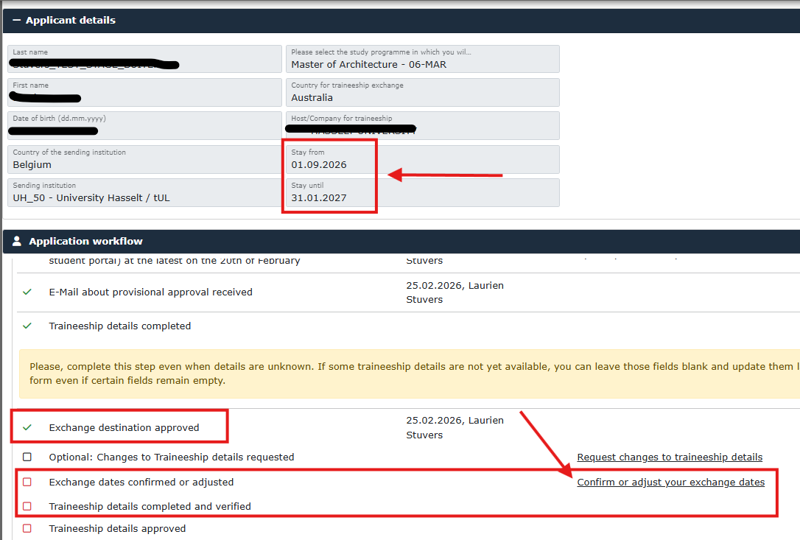
3. Confirm your start and end dates
- Click the link in your workflow: Confirm or adjust your exchange dates (= first day and last day of your traineeship).
- Check at the top of your details if the dates at Stay from (start) and Stay until (end) are correct. Click on Confirm or adjust your exchange dates.
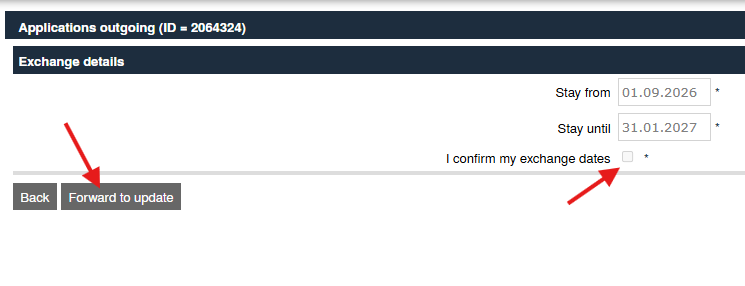
- Click on Forward to update. Adjust your start and end dates if necessary, and check the small box next to I confirm my exchange dates.

4. Waiting for approval
You have now submitted your dates! Your faculty will review and approve them.
5. Second approval of traineeship details
Both you and the faculty must confirm the details one more time to ensure no further adjustments are needed. If changes are necessary, you can still adjust your details during these steps. After these steps, the option to apply for a scholarship will become available.

How to apply for a scholarship
Outside EU (incl. Switzerland & UK)
Outside EU (incl. Switzerland & UK)
Applying for your scholarship
Are you going on a study or traineeship outside of Europe?
Then you must apply for your scholarship before March 10, 12:00 noon! Follow these simple steps in Mobility Online:
- Start your application
Look for the step 'Scholarship form completed' in your workflow. The box next to it is currently empty.
Click the link on the far right: 'Complete scholarship form' to begin.

- Fill out the form
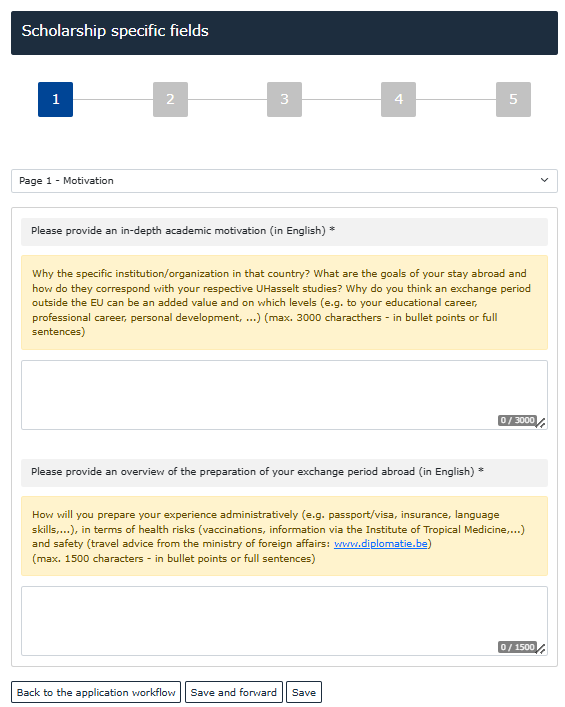
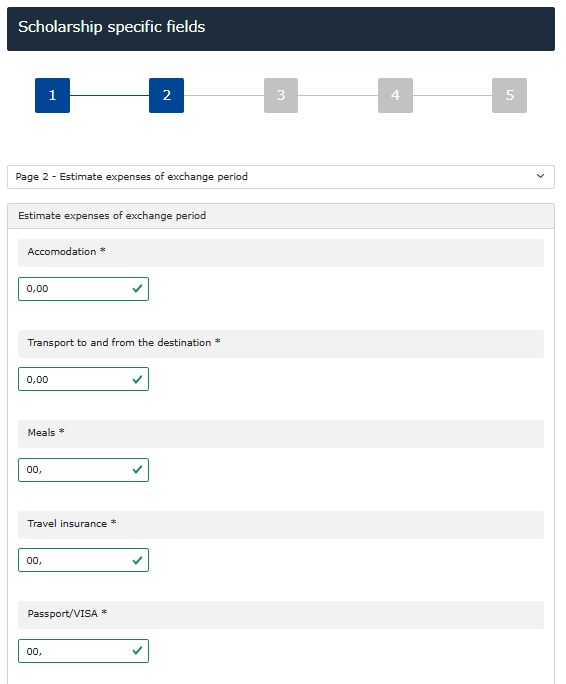
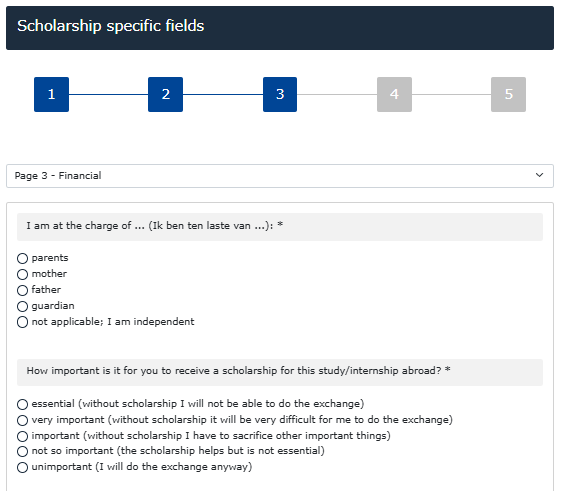
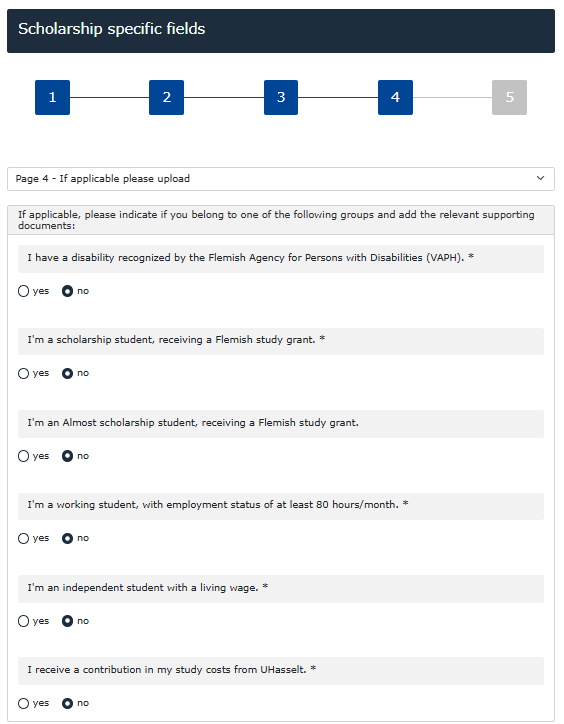
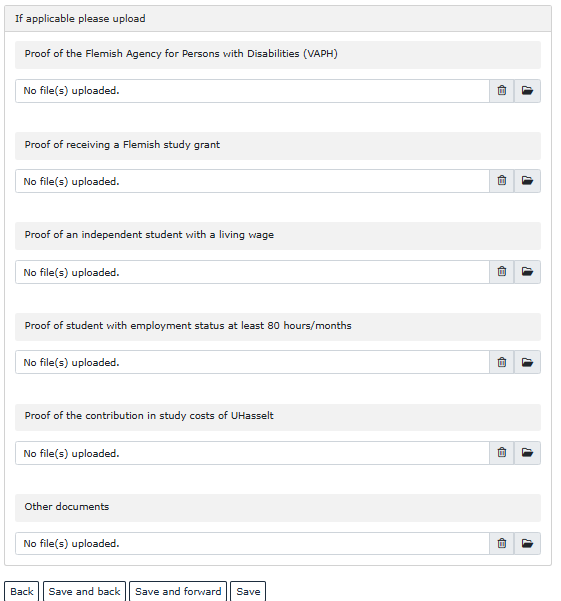
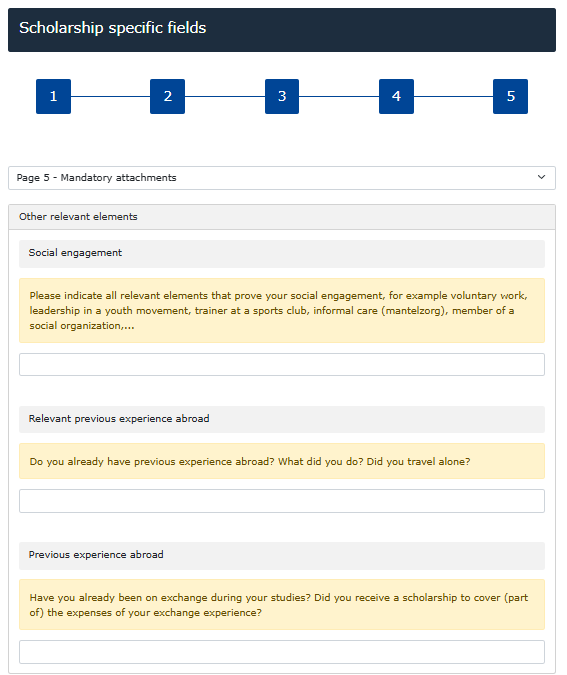
You will enter a new screen titled Scholarship specific fields.
At the top, you will see blocks numbered 1 to 5. This means your application consists of 5 pages that you must complete.
Type your answers in the large white text boxes. Attention: you must write your motivation and preparation in English!
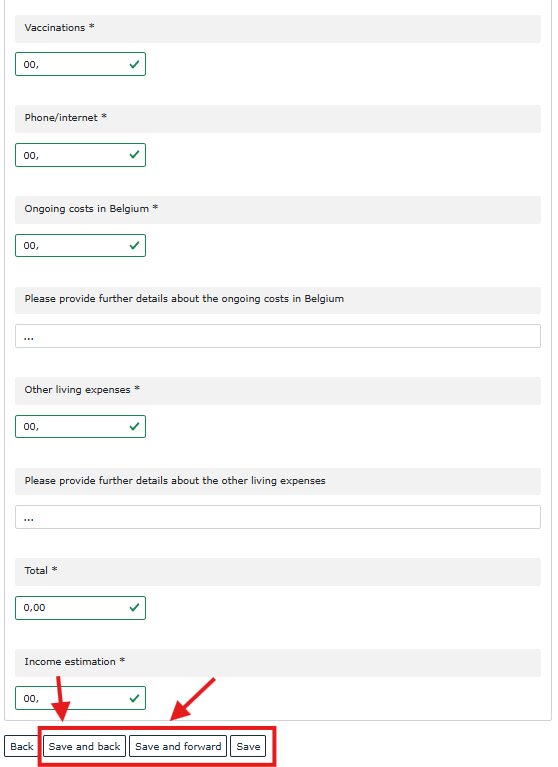
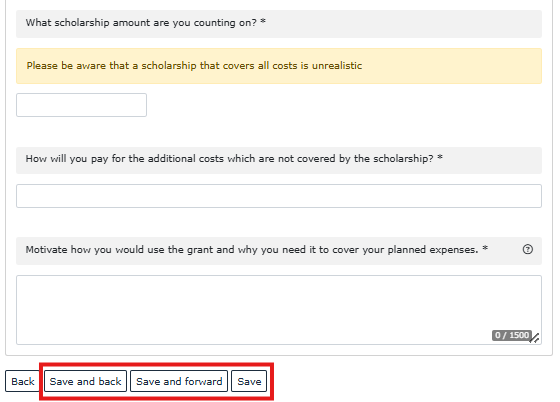
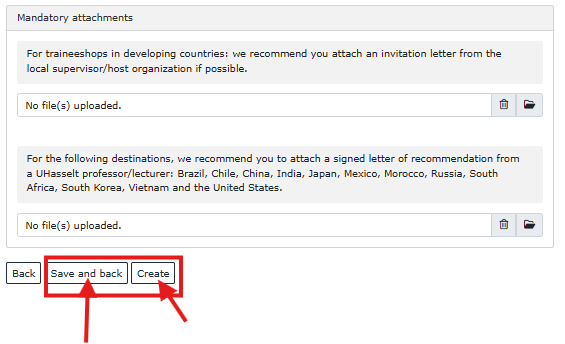
Finished with a page? Click the Save and forward button at the very bottom to save your text and go directly to the next page.
Just want to save without moving to the next page? Click Save.
Want to return to your main menu? Use the Back to the application workflow button.
- Confirmation and waiting
Have you neatly filled out all the pages? Great! Click the Create button at the bottom. A green checkmark will now appear next to Scholarship form completed, along with today's date.

Now it is time to wait again. Your application will be reviewed. If everything is in order and you are ranked for a scholarship, you will receive a confirmation via email.
No scholarship?
You will also receive an email confirmation about this. In Mobility Online, you can then indicate whether you want to continue your study/traineeship abroad without a scholarship, or if you want to cancel your application.
Within Europe (incl. Erasmus Belgica)
Within Europe (incl. Erasmus Belgica)
Applying for your scholarship
Are you going on a study or traineeship within Europe (or taking part in Erasmus Belgica)? Then you must apply for your scholarship before April 30, midnight! Follow these simple steps in Mobility Online:
- Start your application
Look for the step 'Do you want to apply for a scholarship?' in your workflow. The box next to it is currently empty.
Click the link on the far right: 'Answer questionnaire' to begin.
- Fill out the form, confirm and wait
Click the Create button at the bottom. A green checkmark will now appear next to Do you want to apply for a scholarship?, along with today's date.

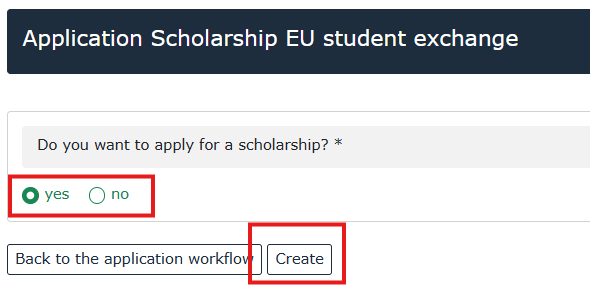

Now it is time to wait again. Your application will be reviewed. If everything is in order and you are ranked for a scholarship, you will receive a confirmation via email.
No scholarship?
You will also receive an email confirmation about this. In Mobility Online, you can then indicate whether you want to continue your study/traineeship abroad without a scholarship, or if you want to cancel your application.
Frequently Asked Questions
I didn’t receive a confirmation email after submitting the form. What now?
I didn’t receive a confirmation email after submitting the form. What now?
After filling out the form, you should receive an automatic email with a personal link to log into Mobility Online. If you don’t see it within about 10 minutes, check your spam folder. If it’s there, mark it as “not spam.” If you still haven’t received it, contact the International Office at: Erasmus@uhasselt.be.
Checklist Before Clicking “Send Application”
Checklist Before Clicking “Send Application”
Make sure the following are correct:
- Studentnumber correct
- UHasselt-e-mail address
- Correct study programme
- Correct semester selected
What is a Transcript of Records?
What is a Transcript of Records?
What is a Transcript of Records?
A Transcript of Records is your official grade report, providing a complete overview of all your achieved academic results (per course: course name, number of credits, and grade).
How to download your Transcript of Records
Are you a 2nd- or 3rd-year bachelor student?
- Log in to the Student Portal.
- Navigate to the page where you can view your academic results (see screenshots below).
- Download your grade reports for all bachelor years.
- Combine all documents into a single PDF file.
- Upload this PDF file to your file in Mobility Online.
Are you a master’s student?
- Log in to the Student Portal.
- Navigate to the page where you can view your academic results (see screenshots below).
- Download your grade reports for all bachelor years.
- Download your master grade report as well (or both master year 1 and master year 2 grade reports).
- Combine all documents into a single PDF file.
- Upload this combined document to your file in Mobility Online.
When Should I Upload My Transcript of Records?
When Should I Upload My Transcript of Records?
You should only upload it once all your latest exam results are available and before the deadline (e.g., February 20).
How Can I Access My Dossier Later?
How Can I Access My Dossier Later?
You can always view your dossier via the link emailed to you (CLICK HERE). Log in with your UHasselt email and password.
What If I’m Unsure Whether to Apply for Study or Internship?
What If I’m Unsure Whether to Apply for Study or Internship?
If you’re unsure, you must submit both a study application and an internship application before the February 20 deadline.