
Data Management
In each research project, efficient management of research data is an implicit part of good and integer research. Discover best practices for research data management from the start of your project, throughout its lifecycle, and beyond its completion.
Data Management Plan
A data management plan (DMP) is a dynamic (i.e. 'living') document in which you write down your intentions concerning data management during and after your research project. Creating a DMP at the beginning of your project helps you to reflect on how you will collect and process data, where you will store them, which security measures you should provide, which costs you should consider, etc. That way, you are well prepared from the very start, eliminating the risk of data loss, confusion (which version was the last one?), avoiding legal issues and other unhappy outcomes while making your data findable and reusable by others (win-win). The DMP itself is not a place to store data.
Register via the RDM Training Calendar for our info sessions ("RDM essentials") and DMP writing sessions.
Step-by-step DMP guide
Step-by-step DMP guide
The following workflow can guide you through the process of preparing, reviewing and submitting your Data Management Plan (DMP). It can be applied when preparing an application DMP, initial DMP or full DMP, depending on your funder’s requirements. More information about these different types of DMPs is provided below.
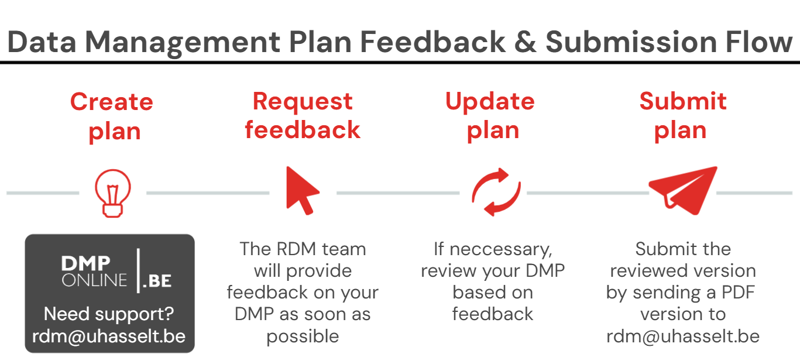
| 1 | Write your DMP |
In DMPonline (more information below) or in MS Word using a funder template: FWO/BOF/VLAIO-cSBO | BELSPO | Horizon Europe | H2020 | ERC Optional - Make your life easier:
|
| 2 | Request feedback |
|
|
3 | Revise your DMP |
If necessary, adjust your DMP based on the feedback. |
|
4 | Export your DMP |
|
|
5 | Submit your DMP |
|
Applying for a grant (application DMP)
Applying for a grant (application DMP)
- For FWO and BOF-IOF, answer the 6 RDM related questions that are included in the application form. More information: UHasselt guide for the FWO/BOF application DMP.
- For European projects: more information on data management requirements.
At the start of the project (initial full DMP)
At the start of the project (initial full DMP)
For each research project at Hasselt University, an initial data management plan should be submitted within six months after the official start date. Click here for a full overview of the institutional and funder requirements for Research Data Management.
Update the DMP regularly during the research project based on how the data management is implemented. You are not required to submit updates of your plan.
At the end of the project (final full DMP)
At the end of the project (final full DMP)
Complete your DMP (either the DMPonline version or the MS Word version) so that it is a true representation of how the data management was implemented in your research project. Send the PDF version of your final DMP to rdm@uhasselt.be; and submit it to your funder with the final report if necessary.
For FWO, consult this Cheat sheet: submitting a final DMP https://doi.org/10.5281/zenodo.10985170.
DMPonline
DMPonline
DMPonline is a user-friendly tool for creating a data management plan. Below you will find a basic step-by-step plan for this tool, and an extensive manual can be found via this link. A key benefit of using DMPonline is the built-in guidance provided alongside each question, helping users complete their data management plan. The platform also supports collaborative working and exchanging feedback through its commenting functionality.
- Select your institution (e.g. Hasselt University) and log in with your user account.
- Click on the tab 'Create plans' at the top to generate a new plan. Give your plan a title and select your funder to automatically create a new DMP according to the DMP template of your funder (FWO, BELSPO, Horizon, ERC, VLAIO, FNRS). For BOF, IOF, and other cases (e.g., doctoral schools' requirements), tick "No funder associated with this plan or my funder is not listed" to generate the Flemish DMP template.
- Fill in the project details. Make sure the box 'Hasselt University' guidance is checked to have access to our recommendations.
- Select the tab 'Application DMP' or 'Full DMP' based on the stage of your research project (see above) and answer all the questions.
- In the tab 'Share' you can give other contributors read and/or write permissions in order to collaborate on the DMP.
- In the 'Request feedback' tab you will find a button to request feedback from the RDM team. The RDM stewards will receive your request, review your plan, and notify you about the follow-up. You can also contact the RDM steward of your discipline directly for questions/guidance.
- The 'Download' tab allows you to export your plan in the format of your choice (e.g. pdf).
You are not required to use DMPonline. You may also use another tool, but make sure the questions from your funder's DMP template are answered.
Data Description
Sound data management – and, hence, a well-thought Data Management Plan (DMP) – starts with identifying a complete and detailed list of all data you will collect, generate, and (re)use.
Research data are all data generated, collected or used in the context of any research project.
As a result, this broad definition includes a wide array of types and formats of data, ranging from raw data to processed and even published data. Examples may include, but are not limited to: notes, surveys, figures, objects, audio-visual files, spreadsheets, databases, statistical data, geographical data, research software, simulations, samples (including biological material, personal data, patient data, etc.).
Register via the RDM training calendar for the introductory course "RDM essentials" to learn more about research data (management).
Data types
Data types
| Origin of the data |
Generate new data Reuse existing data |
| Stage in the research project |
Raw data Processed data Analyzed data |
| Type of the data |
Audiovisual Numerical Image Model Software Text Workflow Physical object |
| Format of digital data |
When focussing upon the format of research data, one sees that (digital) research data occur in many different technical file formats, depending on the software used for collection, analysis, and processing. However, once data analysis is completed and the data are being prepared for long-term archiving, consider converting the research data to a more limited set of open or standard formats to ensure long-term accessibility and usability (more information in the section On sustainable formats for data archiving in Preservation) |
“Help – I don’t have any research data!”
“Help – I don’t have any research data!”
In some disciplines – such as theoretical mathematics, arts or law – you may ask yourself whether you actually have research data. In that case, research data can be defined as all information, generated as part of the scientific process, on which scientific conclusions are based. Just imagine: your computer crashes and your (home) office is destroyed by fire – what information would have gone lost in order to write a scientific publication? Well, that’s research data!
Also keep in mind that physical items, such as books, codes, maps, and artefacts are also research data, as well as (handwritten) notes, proofs, annotations etc. that support the conclusions in your published work.
Check out the poster "No Data" to Manage? Think Again! from VUB, an RDM cheat sheet for the humanities and theoretical disciplines.
Reuse existing data
Reuse existing data
Reused data are generated by third parties and/or within the scope of another research project.
Why would you reuse data?
At the start of your research, investigate whether there are datasets that you can reuse. In doing so …
- You can avoid spending time and money on new, unnecessary experiments.
- You can run analyses to verify the existing data, providing a strong basis for your follow-up research.
- You can gain new insights for your research.
- You can embed your research in the existing knowledge network.
How can you reuse data?
Reused research data can originate from a variety of sources. Such data may be shared by academic, clinical, or other not-for-profit organizations, obtained through collaborations with industry partners, or accessed via commercial data providers through the purchase of existing datasets. It is also possible to reuse datasets from previous research projects, or datasets that are publicly available in a database or repository. There are specific discovery services to help you find datasets, e.g. EOSC Research Hub for Data, Datasearch and Datacite.
When you have found the relevant data for your research, it is important to consider the following:
- What is the quality of the data? Do they come from a trusted source (e.g. CoreTrustSeal)?
- What are the terms and conditions for access and use: how can you access the data? Is it free of charge?
- Do you have the appropriate software available to import/read/analyze the data?
- Are there sufficient metadata provided to understand and reuse the dataset?
- How can you reuse the data? What are the policies and regulations for sensitive data? Which license is attached to the dataset? More information.
Once you have established the accessibility, interoperability and (re)usability of the dataset, you can start processing the data.
Make sure that you cite the dataset properly, using a data citation and a persistent identifier (e.g. DOI). When there are multiple versions of the dataset, make it explicit which version you have used in your research.
Research software
Research software
What is research software?
Research software is newly created software during a research project to support research activities such as data analysis, simulation, visualization, and machine learning. Research software includes:
- Source code files
- Algorithms
- Scripts
- Computational workflows
- Other executables created during the research process or for research purposes
(Re)using existing software in research?
For any software components (e.g., operating systems, libraries, dependencies, packages, scripts, etc.) used for research but not created during or with a clear research intent, it is important to consider the restrictions or licenses that apply to the software. Examples:
- Proprietary software is owned by a private company and is not available for free. Proprietary software may have requirements for its use, such as requiring users to sign a license agreement or pay a licensing fee.
- Open-source software is freely available for anyone to use, modify, and redistribute. Open-source software may have requirements for its use, such as requiring users to give credit to the original authors or to make their own modifications available to the public.
Reusing existing open-source software in your newly generated research software?
Re-using (parts of) open-source software in your newly generated research software requires some additional attention.
 |
It is important to review if the open-source software has a license: YES - Adhere to the conditions of reuse: - Who can use the software? - How can the software be used? - Can the software be modified, redistributed, and used for commercial purposes? NO - We advise you not to reuse the software since the author did not provide permission to copy or reuse it. If you do want to use it, contact the author to verify which license applies. |
Need support in determining the license conditions? Contact RDM helpdesk.
Software Management
|
Good Practices |
Software Management Plan: A guide to implement best practices for research software development facilitating accessibility and reproducibility.
- For who? Recommended for any researcher creating research software. However, at the moment, this is not a funder requirement or deliverable.
- More information? Browse through the Practical Guide to Software Management Plans section 6, including examples of SMPs.
- Interested? Contact RDM helpdesk.
GitHub
License: free (Github Enterprise access Github Campus Program)
GitHub is a cloud-based platform to store and maintain Git repositories facilitating collaboration. Available via the UHasselt Software Center or via:
|
Link your ORCID profile to GitHub If you already have a GitHub account and an ORCID iD, simply sign in to GitHub and go to https://github.com/settings/profile to authenticate your ORCID iD. From the settings page, scroll down to the button that says Connect your ORCID iD. Clicking that will take you to the ORCID sign-in page to authorize access. Check out this helpful instruction video to walk through the process. |
Legal & Ethical Compliance
Consider the ethical and legal issues when handling personal, confidential, or third-party data. These ethical and legal issues can have implications for data storage, security, preservation, and sharing.
Research Ethics
Research Ethics
Ethical clearance is required for research proposals funded by Europe, SB, BOF and FWO.
Before collecting data, verify if you need to apply for ethical approval when your research involves:
- Human subjects and personal data: any involvement of human subjects in the research project, e.g., interviews, questionnaires, focus groups, observations, medical interventions, etc.
- Human/biological materials
- Living animals
- Genetic resources: seeds, plants, and other living organisms
- Dual-use or misuse: Items, including software and technology, which can be used for both civil and military purposes. The term "misuse" is defined as "research that could be misused for unethical purposes".
Before reusing data, verify if you need to apply for ethical approval when your research involves:
- Reuse of patient data (retrospective study): ethical clearance is required by Committee for Medical Ethics (CME UHasselt; Dutch only)
- Reuse of personal data collected in a previous project or work package (excluding medical data) does not require ethical approval. However, all processing (including reuse) of personal data must be clearly documented in the GDPR register. Before reusing personal data, complete the General GDPR-checklist separate from ethical approval (NL).
- Human/biological materials
- Third-party data: data collected outside of the project itself, e.g. data from public organizations, commercial vendors, and other projects, …
- Genetic resources: seeds, plants, and other living organisms
Personal Data
Personal Data
Research activities may involve the collection, use, storage, sharing, or reuse of personal data. Under the General Data Protection Regulation (GDPR), personal data means any information relating to an identified or identifiable natural person.
When processing personal data for research purposes, appropriate technical and organizational measures must be implemented to ensure the security, confidentiality, and protection of the data. In addition, all processing and reuse of personal data for research purposes must be recorded in the institution’s GDPR register before the activity starts.
Register via the RDM Training Calendar for our hands-on de-identification trainings.
More information on GDPR in research
Intellectual Property Rights (IPR) and valorization
Intellectual Property Rights (IPR) and valorization
At the start of your research project, contact your business developer if your research project includes:
- Reuse of third-party data: data created outside of the project itself, e.g. data from public organizations, commercial vendors, and other projects, …;
- Data collection or processing in collaboration with external partners to clarify who owns the IPR of the data/creations resulting from the research;
- Data or research output of interest to society in general or to a specific company (valorization);
- Intellectual property rights to protect a (technical) invention, a trademark, a new plant variety, (industrial) designs, and literary/artistic works.
The business developer can verify if you need an agreement or contract, for example:
- Data/Material Transfer Agreement
- Collaboration agreement
- License Agreement
- Non-Disclosure Agreement
- License Agreement
Data Documentation & Metadata
Clear and detailed documentation of research data is essential to improve the data quality as well as to make your data understandable and (re)usable for yourself and others.
Documentation
Documentation
Documentation is needed at two levels: documentation about the entire study or project on the one hand, and documentation about individual records, observations or data points on the other.
| Study-level documentation | Study-level documentation provides high-level information about the research context and design, for example, the project title and summary, data collection methods, authors and institutions involved, sources of secondary data, license and identifier for each dataset, folders structure, file naming conventions, versioning system, the relation between files or resulting publications, and other general information. |
| Data-level documentation |
Data-level or object-level documentation provides in-depth information about individual variables or records, for example, variable names, labels and descriptions (numeric, string, regular expression, date, etc.), units of measurement (cm, kg, etc.), calibration of instruments, controlled vocabulary or ontology terms accepted as values for each variable, missing values code, etc. |
Data documentation can take many different forms. Depending on your discipline, examples may include, but are not limited to:
- Ontologies, controlled vocabularies and thesauri (examples)
- Methodologies and protocols (examples)
- Investigator Site File (clinical trials)
- Logbooks and (electronic) lab notebooks (see the topic Electronic Research Notebooks in this section Data Documentation & Metadata)
- Index of abbreviations and naming conventions
- Software syntax and code annotations
- Codebook (more information and examples)
- Database schema (more information)
- Field notes
Best practice: create at least one readme.txt-file per dataset
A more general approach to data documentation is a so-called readme.txt-file. It is basically a plain text file in which you bring together all information that might be necessary for peers or for your future self to be able to understand and (re)use the research data. Such readme.txt-file typically contains more information on:
- Context: e.g. research design, protocols and methods
- Content: e.g. definition of variables and parameterization
- Structure: e.g. relation of data, figures and tables
Like all other forms of data documentation, the file should be created simultaneously with the dataset itself, and updated if needed. Inspiring templates and examples can be found on the websites of Harvard and Cornell University.
Metadata
Metadata
What is metadata?
As it stands, metadata actually serve the same purpose as data documentation, as described above: they provide all information needed to understand and reuse the data. However, while documentation can only be interpreted by humans, metadata are automated “translations” of this information and can consequently also be read by machines and computers. They are typically formatted as a .xml or .json file, either embedded in the data file itself or captured separately.
As these metadata are machine-readable, it implies that metadata are highly structured and comprise a fixed set of elements, as defined by an established metadata schema. Therefore, it is advisable not to create your own schema but to use an existing and community-endorsed standard.
By doing so, you can score on the FAIR principles and your funder's requirements.
| Domain-specific metadata schema |
Depending on your discipline, various domain-specific standards have already been established. You can browse for them using the following websites:
|
| Generic metadata schema |
If no specific standard for your type of research exists to date, you can always resort to a generic schema, such as Dublin Core. In its most simple form, it comprises 15 elements that can be applied to virtually every discipline. A handy tool to create your own metadata according to this schema can be found here. |
Metadata repository @ UHasselt
As a UHasselt researcher, you are expected to upload the metadata of the datasets underlying your peer-reviewed publications. This can be done via the UHasselt metadata repository, which uses the metadata standard DataCite. This repository has been integrated into the Document Server (the database to deposit your publications).
Storage (during project)
- Consult the Hasselt University Research Data Storage Guide for more information on the institutionally recommended solutions for data storage, transfer and collaboration.
- Consult our Security webpage for more information on technical and organizational measures to protect your research data.
In the section below, you will find additional information on back-up procedures and good practices for data organization (folder structures, file naming, versioning, etc.). Register via the RDM Training Calendar for our hands-on "Tidy Data" sessions to get started with these guidelines.
Best practices for backup & data organization
Best practices for backup & data organization
- Create a golden copy of your raw data as soon as possible after data collection. The golden copy is the original version of the raw (source) data. Use a "working copy" for processing or analyzing data. [Based on OpenAire]
- Backup your data on a regular basis.
- Automatic backups are created if you use the institutional storage solutions.
- Discover recommended tools to back up, synchronize, or mirror data to various locations.
- Use a logical folder structure. Adhere to the existing standards or templates within your research group.
- Use consistent, logical, and meaningful names for folders and files. Adhere to existing file naming conventions within your research group.
- Use version history or manual version control.
Preservation (after project)
Once your research project is wrapped up, it is important that your data are suitably stored or archived for future reuse in new research and for verification purposes. It is recommended to preserve your research data and related documents on an institutional storage location that is managed by your supervisor. It is not advised to use local devices (e.g., USB or external hard drives) for archiving purposes, as you risk losing your data in case of damage or loss as well as unauthorized access.
Register via the RDM Training Calendar for our annual info session on "Wrapping up your research project".
Which data should you (not) preserve?
Which data should you (not) preserve?
Hasselt University recommends in its RDM policy plan to keep relevant research data generated during research projects for a minimum of 5 years for reproducibility, verification and potential reuse:
- Data underlying a publication or patent application;
- Data that is necessary for validation and/or verification;
- Unique data or data that is not easily reproducible (e.g. observational data, raw data, analysis workflow);
- Data that will probably be reused in the future;
- Data of great value for society (scientifically, historically or culturally).
Valid reasons not to keep certain research data include:
- Ethical and/or legal restrictions on keeping personal data beyond the research project;
- Contractual restrictions when (re)using third party data;
- Easy or low-cost reproducibility of the data (e.g. output files of models);
- Temporary or mutable nature of the data during certain stages of processing.
Do not forget to consider the preservation plans for your physical data:
- In case of analogue data on paper, you may create a digital version by making a transcript, scan or image and subsequently destroy the original paper version (e.g. completed survey forms, handwritten notes during interviews). However, in case of documents that contain a signature and have legal value (e.g. signed consent forms), you must keep the original.
- In case of physical samples and chemicals, you should consider the long-term stability of these materials, and the available storage facilities (that are, fridges and freezers) in terms of physical capacity as well as cost efficiency. In addition, all human bodily materials should be submitted to University Biobank Limburg.
For how long should you preserve your data?
For how long should you preserve your data?
All relevant research data generated during research projects at Hasselt University should be kept for minimal 5 years. In this regard, the university is in line with the requirements of some major Flemish funders (including FWO, EOS and VLAIO cSBO), also mandating a data retention period of at least 5 years.
For clinical trials with medicinal products for human use, the clinical trial master file must be kept for 25 years (Regulation (EU) No 536/2014 of 16 April 2014).
When working with personal data, the General Data Protection Regulation requires that these data cannot be kept longer than necessary for your current research or for possible further analyses of the data (storage limitation principle). Nonetheless, personal data can be kept longer if they are needed, for example, in order to follow-up in longitudinal studies, to verify published results, to comply with contractual obligations, or to protect Intellectual Property Rights. In addition, when your data subjects have given explicit consent to the processing of their personal data, you can also ask for their permission to keep the personal data for a fixed period of time (e.g. 5 years).
On sustainable formats for data archiving
On sustainable formats for data archiving
Given the enormous variety of data types, it comes as no surprise that (digital) research data likewise occur in many different technical file formats, depending on the software used for analysis and processing. However, once data analysis is completed and the data are being prepared for long-term archiving, you should consider converting your research data to a more limited set of standard, interchangeable and longer-lasting formats. Using or converting to such sustainable formats ensures the long-term usability, accessibility and sustainability of your data, and consequently is one of the key elements for FAIR data.
This typically means using open or standard formats instead of proprietary ones. Common examples of open formats include: OpenDocument Format (ODF), ASCII, tab-delimited format (.tsv), comma-separated values (.csv) and XML. For more information on recommended file formats, check out these websites: UK Data Service and DANS.
Data Sharing
After completing your research project, you can choose to not only archive your data but also share (part of) it with the wider scientific community. This involves publishing the data in a trustworthy external repository, with open, embargoed, or restricted access. This section provides more information on the benefits of data sharing and the available approaches, including options for sharing software.
Register via the RDM Training Calendar for our annual info session on "Wrapping up your research project".
Benefits of data sharing
Benefits of data sharing
By sharing your data, they can be replicated and verified, enhancing the quality and integrity of your research. In addition, you will help to accelerate innovation, because other researchers can build on your findings. If that does not convince you, take a look at what the benefits are for you personally:
- You can make your research results known immediately to the scientific community, increasing the visibility and impact of your research.
- Your dataset, when it is uploaded in a repository or published in a data paper, will receive a persistent identifier (e.g. DOI), making it findable and citable by other researchers.
- By sharing your data with your peers, collaboration will become easier.
- Your dataset will serve as official documentation accompanying your research paper.
- You meet the requirements of institutions, funders and publishers.
Restrictions & access levels
Restrictions & access levels
You should only share the data that are scientifically relevant and crucial for follow-up research. Several access levels are available when you share via an external platform:
- Open access: immediately and permanently online, and free for all on the Web, without financial and technical barriers.
- Embargoed access: metadata only access until released for open access on a certain date.
- Restricted access: available in a system but with some type of restriction for full open access (e.g. login or data access request required).
- Metadata only: access is limited to metadata only.
Think twice about opening up the following types of data:
- Sensitive data – including personal, confidential and biological data – should be protected or destroyed after the end of the project. If you want to share those data, you should consider the provisions as set out in the informed consent or contractual agreement, and take the necessary security measures, e.g. anonymization or pseudonymization, and encryption.
- You may not be allowed to share the data that you have reused or the data that you have generated based on 3rd party data. Read the 3rd party data agreement carefully.
- You may not be allowed to share data because of Intellectual Property Restrictions (IPR) or because they have a potential for tech transfer and valorisation.
For more information on sensitive data, 3rd party data, IPR and valorisation, see Ethical and legal.
Solutions for (meta)data sharing
Solutions for (meta)data sharing
It is recommended to share your data in a data repository, which is an online database where you can deposit your dataset(s). It provides many benefits, such as unique and persistent identification of datasets (e.g. DOI), the provision of rich metadata, curation through automatic back-ups and checksums, access control possibilities (e.g. authentication procedures), licensing options, etc.
|
✔ |
It is recommended to use a domain-specific repository, such as 4TU.ResearchData (for sciences & engineering) or SODHA (for social sciences & digital humanities). You can search for a suitable repository using Re3Data and/or FAIRsharing. |
|
✔ |
If you cannot find a domain-specific repository, you can turn to a general-purpose repository, such as Figshare, Dryad, Harvard Dataverse or Zenodo. Generalist repositories accept data regardless of data type, format, content, or disciplinary focus. For an overview, see the Generalist Repository Comparison Chart (3.0) by Stall, S. et al. (2023). Add your dataset to the Hasselt University community on Zenodo |
|
✔ |
Researchers affiliated with UHasselt are expected to upload the metadata of the published datasets underlying their peer-reviewed publications in the UHasselt metadata repository (Document Server). Be aware that this is not a platform to upload datasets. |
|
✔ |
It is also possible to publish your dataset in a data paper with a traditional journal or a specific data journal. A data paper will allow you to describe your dataset in more detail, increasing its visibility and chances of being reused. |
Wherever you deposit or publish your (meta)data, make sure that they adhere to the FAIR principles. For this reason, we do not recommend using any of the following alternative routes to data sharing, as they do not allow for any sort of version control or licensing, and they do not make your data findable and accessible for a wider audience:
|
⚠ |
Institutional storage locations are only suitable for collaborating on research data within Hasselt University during your research project. |
|
⚠ |
Avoid using external devices (e.g., USB drive, external Hard Drives) to avoid data loss and security breaches. However, if you do need to use an external device, make sure to encrypt the device. |
|
⚠ |
E-mail and WeTransfer are risky exchange tools. Belnet FileSender is a safe alternative for a one-time share. |
|
⚠ |
Publishers may ask you to add underlying datasets as supplementary materials to the article itself. This is not equivalent to publishing data in a dedicated repository and does not offer the same benefits, such as persistent identifiers, licensing, version control, etc. |
Sharing research software code
Sharing research software code
-
Create a citable snapshot of your code
Use Zenodo to generate a DOI for your software version. This ensures your code can be properly cited in publications.
Follow the instructions provided on GitHub. -
Add your output to the UHasselt Zenodo community
UHasselt has its own Zenodo community where you can publish research outputs (e.g., software code, related posters, etc.).
When uploading, select the UHasselt community. -
Use the Research Software Directory (RSD)
This platform increases visibility and makes your software discoverable for other researchers. After creating a DOI, register your software in the Research Software Directory.
Log in using your UHasselt SSO for access.
Licenses
Licenses
When sharing your research data, selecting a suitable reuse license for your data is crucial so that other researchers clearly know under which conditions they can or cannot reuse your data. For example, do you want attribution for your work, or do you want to allow others to use your work commercially, or do you want to allow others to remix, adapt, or build upon your work?
- If the dataset does not involve software source code, you can choose from the Creative Commons licenses. The Creative Commons License Chooser conveniently helps you to select a suitable license, but keep in mind that Hasselt University requires that appropriate credit should be given to you as (co-)author and, hence, to your affiliation to Hasselt University. To put it more concretely, the university does not accept sharing research data in the public domain (CC0), but minimally requires Creative Commons Attribution 4.0 International (CC-BY-4.0).
- If you want to share software source code, you can choose from a wide variety of open-source software licenses. A license selector can help you in deciding which license fits best to your needs for your source code.
- More information on copyright.