
UHasselt Research Data Storage
View the content of this page
Storage Guide
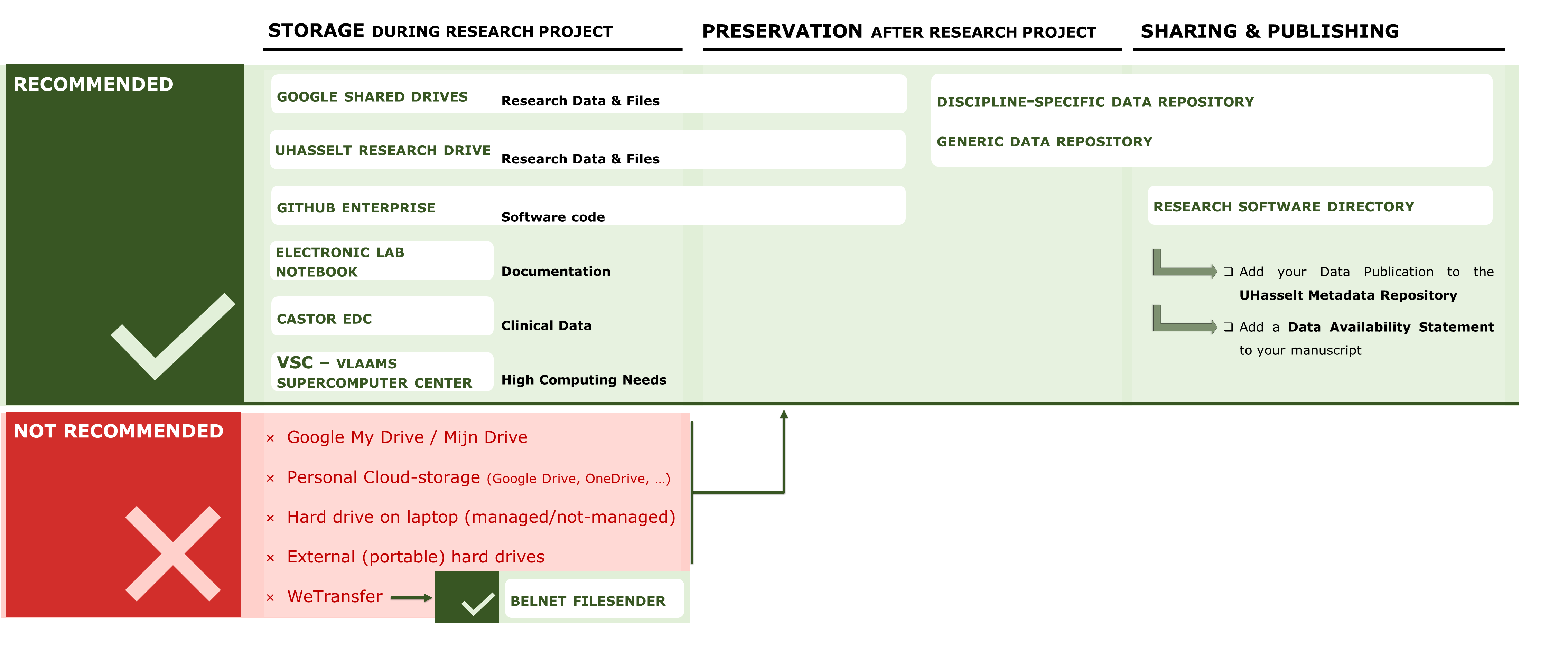
Institutional storage solutions
Physical Datasets
- Follow the standardized practices in your research group and choose a suitable storage location according to the needs for your data type.
- Use keys and badges for physical access control to the offices and storage facilities (cabinet, fridge, freezer etc.).
Digital Datasets
- Use a cloud-based (e.g., Google shared drive) or network storage (e.g., UH research drive) solution that allows you to share your data with your hierarchical responsible (e.g., promotor, supervisor) from the start of the project.
- As the RDM policy plan describes, sharing your research data (and related documents) with your hierarchical responsible (e.g., promotor, supervisor) is mandatory.
|
Google Shared Drive Microsoft SharePoint (Teams) |
UH research drive |
Remarks |
|
|---|---|---|---|
|
Location |
Cloud-based storage in Europe Migration to Microsoft in Q2 2026 - 2027 |
Institutional on-premise network attached storage Not impacted by migration to Microsoft |
|
|
Intended use |
Comprehensive and simultaneous collaboration.
Recommended for working documents. |
All research data Recommended for raw/unprocessed, passive and/or archival data Especially, high-volume, confidential, or sensitive research data |
|
|
Maximal storage size |
Up to 1TB / drive * Google:
Microsoft:
|
Unlimited |
* For Google Shared Drive, the 1TB storage limit can be increased on request to enable external collaboration. |
|
Confidential or sensitive data |
No * |
Yes |
Confidential or sensitive data are information that need enhanced protection because of legal, ethical, contractual, procedural, or policy obligations. More information on confidential or sensitive data. * For Google Shared Drive, data encryption might be necessary depending on the type of data. |
|
Sharing & collaboration |
Extensive collaboration possibilities inside and outside UHasselt. Collaborative, simultaneous editing is possible. Recommended for collaboration with external partners. |
Non-simultaneous collaboration with UHasselt personnel.* Recommended for collaboration within UHasselt. |
* On the UH Research Drive, external sharing requires requesting a UHasselt Guest account. |
|
Security |
Medium |
High |
|
|
Back-up mechanism |
Versioning |
Snapshots |
|
|
Access Management |
|
|
|
|
Price
|
< 1TB: free |
< 1TB: free |
These costs apply to projects starting on or after January 1, 2026. For data volumes exceeding 1 TB, the cost is calculated as: (Volume in TB − 1) × €100 × Number of years Example: For 5 TB stored over 10 years: (5 − 1) × €100 × 10 = €4,000 |
UH endorsed external solutions
Belnet FileSender
Belnet FileSender
The Belnet FileSender is the preferred solution for a one-time data transfer. It allows you to securely share large (up to 5TB) data files.
Avoid using external devices (e.g., USB drive, external Hard Drives) to avoid data loss and security breaches. However, if you do need to use an external device, make sure to encrypt the device.
Electronic Data Capture (EDC)
Electronic Data Capture (EDC)
Electronic Data Capture (EDC) software provides an efficient and safe platform in compliance with Good Clinical Practice (GCP) and GDPR, which can be used to build and manage your electronic case report form, online surveys, and databases. EDC software is mandatory for clinical studies but is not restricted to this type of research.
At Hasselt University, the following EDC is recommended and partly supported (financially):
- Castor. Castor complies with ICH-GCP (Good Clinical Practice) which is a requirement of the KCE (Belgian Health Care Knowledge Centre) to compete for funding.
Castor EDC is coordinated by LCRC. If you have any further questions, please contact lcrc@uhasselt.be.
Electronic Research Notebook (ERN/ELN)
Electronic Research Notebook (ERN/ELN)
An Electronic Research Notebook (ERN) or Electronic Lab Notebook (ELN) is an efficient tool for documenting and storing data in a secure environment with access control and for collaborating with colleagues. It is a digital equivalent of the paper laboratory notebook in which data documentation (protocols, parameters, experiment set-up, descriptions/results of experiments, etc.) are stored for verification, future use, valorization purposes, etc.
Based on the advice of an internal multidisciplinary expert panel, Hasselt University recommends and partly supports (financially):
- Signals Notebook: For discipline-specific use (Chemistry, Biology and Physics). Molecular drawings are possible.
- eLabFTW: For general use. Very user-friendly, and intuitive.
- Open Science Framework (OSF): For international use. This ELN requires additional training.
We have trained ELN champions at Hasselt University who can offer colleagues support in a very accessible way and, if necessary, can give short information sessions:
- Neurology: Lieve Van Veggel, Elisabeth Piccart (eLabFTW)
- Immunology: Igna Rutten (eLabFTW)
If you would like more information about ELNs, please get in touch with our RDM helpdesk.
GitHub
GitHub
License: free (GitHub Enterprise access GitHub Campus Program)
GitHub is a cloud-based platform to store and maintain Git repositories facilitating collaboration across research software projects.
Requesting a GitHub Enterprise Repository:
- Submit a ticket to ICT to request your repository.
- Provide the repository name in this format: github.com/UHasselt-[faculty/researchinstitute]-[researchgroup]
- List the administrators / users: every admin/user needs a personal account. Please add your GitHub username (@username) so that the IT department can link it.
Vlaams Supercomputer Centrum (VSC)
Vlaams Supercomputer Centrum (VSC)
VSC is a storage solution for research projects with large datasets and high-performing computing needs. More information is available through the VSC website, such as:
If you conduct research in collaboration with private companies, please get in touch with Geert Jan Bex for more information.
How to request storage
Request research data storage
UH research drive & Google shared drive
- servicedesk.uhasselt.be
- Click the button Register a request
- Select Applications Research & Innovation
- Select Research Data Management (RDM)
- Select Request storage space for active research data
- Complete the form and click on submit
Access management
UH research drive
- servicedesk.uhasselt.be
- Click the button Register a request
- Select Applications Research & Innovation
- Select Research Data Management (RDM)
- Select Change in access to UHasselt Research Drive
- Complete the form and click on submit